
WebM Format Explained: The Open Video Codec for the Web
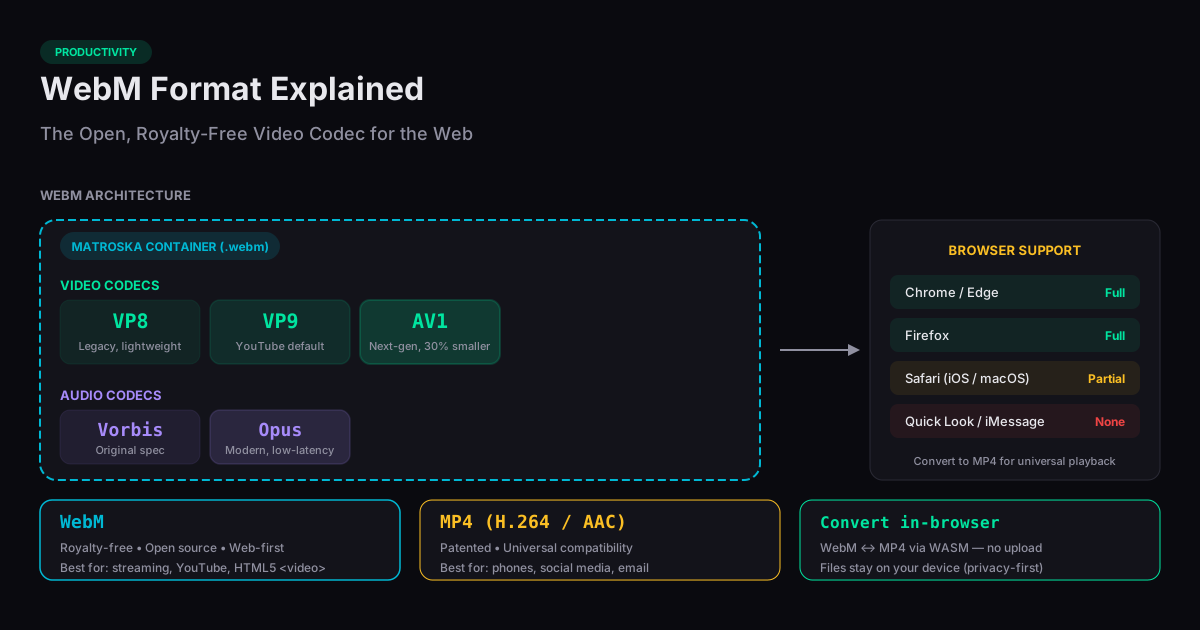
WebM is an open, royalty-free video container format developed by Google in 2010 for the web. It pairs the VP8, VP9, or AV1 video codecs with Vorbis or Opus audio, delivering high-quality playback at file sizes 20–50% smaller than equivalent MP4 files — without the H.264 licensing fees. WebM is the default video format on YouTube and is natively supported by Chrome, Firefox, Edge, and Opera, though Safari and iOS adoption has been gradual and limited by codec.
Why WebM Exists
WebM was created as the web-native alternative to MP4. MP4 relies on the H.264 and H.265 codecs, which require royalty payments to the MPEG-LA patent pool from device manufacturers, broadcasters, and software vendors. WebM uses VP8, VP9, and AV1 — all royalty-free open standards overseen by the Alliance for Open Media. This is why YouTube transcodes every uploaded video into multiple WebM renditions: Google pays no per-stream royalties when serving WebM.
The W3C lists WebM as one of two recommended formats for the HTML5 <video> element, alongside MP4. WebRTC real-time video calls (used by Google Meet, Discord, and Jitsi) also default to VP8 or VP9, both WebM codecs. If your video ever travels over the open web between browsers, it is likely encoded as WebM under the hood.
WebM vs MP4: The Real Differences
At equivalent visual quality, VP9 WebM files are typically 20–50% smaller than H.264 MP4 files, and AV1 WebM delivers another 30% reduction versus VP9. For a 10-minute 1080p video, the savings often land between 100 and 400 MB — meaningful at scale. This efficiency is why streaming services (YouTube, Netflix, Stan) invested heavily in these codecs.
The trade-off is compatibility. MP4 with H.264 plays on essentially every device manufactured since 2005 — iPhones, Windows Media Player, smart TVs, Chromecasts, Rokus, game consoles, and every major video editor. WebM fails on most of these. For web delivery where you control the playback environment (browser-based players, in-app video), WebM wins on bandwidth. For sharing, offline viewing, or legacy playback, MP4 remains the safer choice.
Browser and Device Support
WebM is supported natively on Chrome (all versions since 6.0, released 2010), Firefox (4.0+), Edge (Chromium-based), Opera, and Android (4.0+). Safari gained VP8/VP9 WebM support in macOS Big Sur and iOS 14.1, released in late 2020. AV1 WebM on Safari requires macOS Sonoma or iOS 17 or later — so AV1 content delivered to older Apple hardware must fall back to MP4.
Outside browsers, WebM support is rare. Windows Media Player cannot play WebM without the K-Lite Codec Pack or similar add-ons. Most smart TVs reject WebM entirely. Major video editors — Premiere Pro, Final Cut Pro, DaVinci Resolve — accept WebM but often require transcoding during import. This asymmetry is why so many users end up converting WebM to MP4: downloads from YouTube or OBS screen recordings often land in WebM, but the target application cannot use them.
When to Convert WebM to MP4
Convert WebM to MP4 when you need to share the video via email, Slack, iMessage, or any service that expects broad playback; import into legacy video editors or older operating systems; play on a smart TV, Chromecast, Apple TV, or game console; or upload to platforms that reject WebM (several corporate learning management systems and older social platforms still do).
For conversions that should preserve quality with maximum compatibility, re-encode to MP4 with the H.264 video codec and AAC audio. brevtool has a free browser-based WebM to MP4 converter that runs entirely in your browser via FFmpeg WebAssembly — no upload, no signup, no file size limit. Related tools: extract the audio track only via MP4 to MP3, or create a short loop with Video to GIF.
Frequently Asked Questions
Is WebM better than MP4?
WebM achieves better compression at the same visual quality — files are typically 20–50% smaller thanks to VP9 and AV1 codecs. MP4 has near-universal device support. Pick WebM when delivery bandwidth matters; pick MP4 when compatibility matters.
Does YouTube use WebM?
Yes. YouTube transcodes every uploaded video into multiple WebM renditions using VP9 (and AV1 for newer content). Chrome and Firefox users stream WebM; Safari and older iPhone users fall back to MP4.
Can I play WebM on an iPhone?
Partially. iOS 14.1 and later can play VP8/VP9 WebM in Safari and the Photos app. AV1 WebM requires iOS 17 or later. For full compatibility, convert WebM to MP4.
What codecs does WebM use?
Three video codecs: VP8 (2010), VP9 (2013, YouTube default), and AV1 (2018, highest efficiency). Audio: Vorbis or Opus. All are royalty-free open standards.
Why is my WebM file not playing?
Three common causes: the player does not support WebM at all (QuickTime on older macOS, most smart TVs); the player supports WebM but not AV1 specifically (older Chrome and Safari); or the file is corrupted. Convert to MP4 with H.264 for maximum compatibility.