
What Is Base64 Encoding and When Should You Use It?
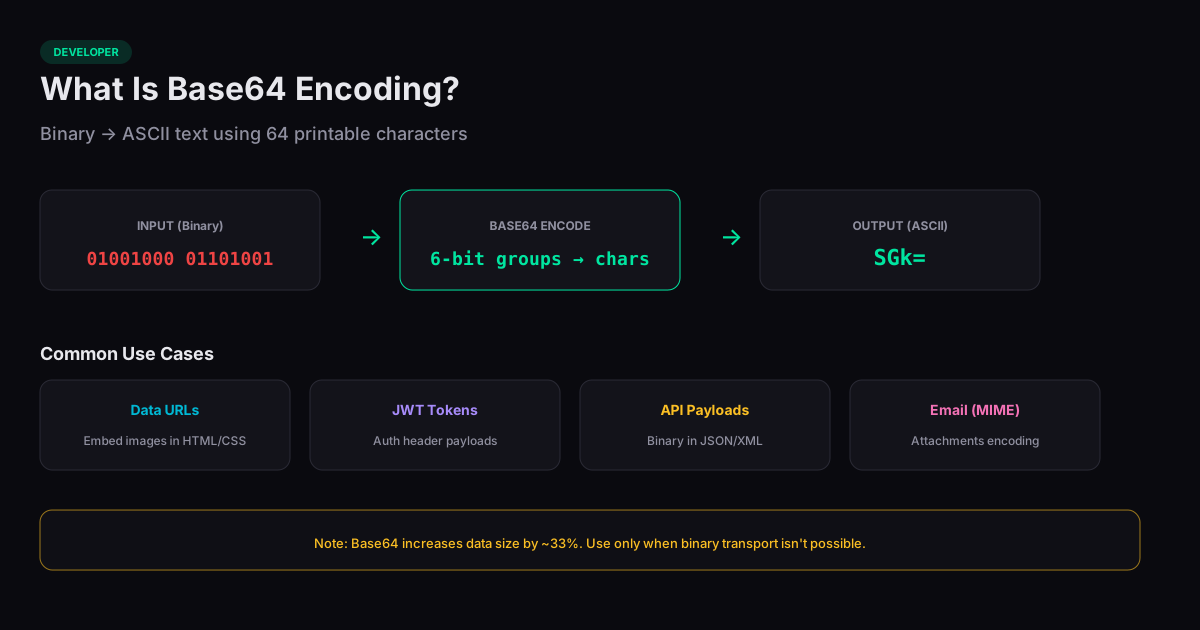
Understanding what is Base64 encoding starts with a simple problem: binary data does not travel well through systems designed for text. Email protocols, JSON payloads, and URL parameters all expect printable ASCII characters. Base64 solves this by converting any binary sequence into a string of 64 safe characters (A-Z, a-z, 0-9, +, and /) that survive any text-based transport.
How the Algorithm Works
Base64 takes three bytes (24 bits) of binary input and splits them into four groups of six bits each. Each six-bit group maps to one of 64 printable ASCII characters. If the input length is not a multiple of three, the output is padded with one or two equals signs (=) to indicate the missing bytes.
This means Base64 output is always exactly 33% larger than the input. A 3 KB image becomes roughly 4 KB when Base64-encoded. This size overhead is the primary tradeoff for the convenience of text-safe encoding.
Common Use Cases
Data URLs are one of the most visible uses of Base64. Embedding a small image directly in CSS or HTML as a data:image/png;base64,... string eliminates an HTTP request at the cost of a larger document. For icons under 2 KB, this is often a net performance win.
JSON Web Tokens (JWTs) use Base64url encoding (a URL-safe variant that replaces + with - and / with _) for their header and payload sections. API authentication headers, email attachments encoded via MIME, and binary data stored in XML or JSON databases all rely on Base64 for the same reason: the transport layer only handles text.
Base64 Is Not Encryption
A common misconception is that Base64 provides security. It does not. Base64 is a reversible encoding — anyone can decode it instantly. It provides zero confidentiality. If you see a Base64 string in a JWT or a cookie, the data inside is readable by anyone. For actual security, use encryption (AES, RSA) or hashing (SHA-256) depending on whether you need to recover the original data.
When to Use Alternatives
Hex encoding (converting each byte to two hexadecimal characters) is simpler and more readable for short values like hashes and color codes, though it produces output that is 100% larger than the input versus 33% for Base64. For large binary files, transferring the raw bytes over HTTP with proper Content-Type headers is more efficient than encoding them as text. Base64 is most useful when you need to embed binary data inline within a text-based format.
Related Tools
Base64 Encode / Decode
Encode or decode Base64 strings directly in your browser.
JWT Decoder
Decode and inspect JSON Web Tokens — header, payload, and signature — in your browser.
Hash Generator
Generate SHA-1, SHA-256, SHA-384, and SHA-512 hashes from any text — entirely in your browser.
URL Encode / Decode
Encode or decode URL strings and query parameters in your browser.