
How to Create Strong Passwords: A Security Guide
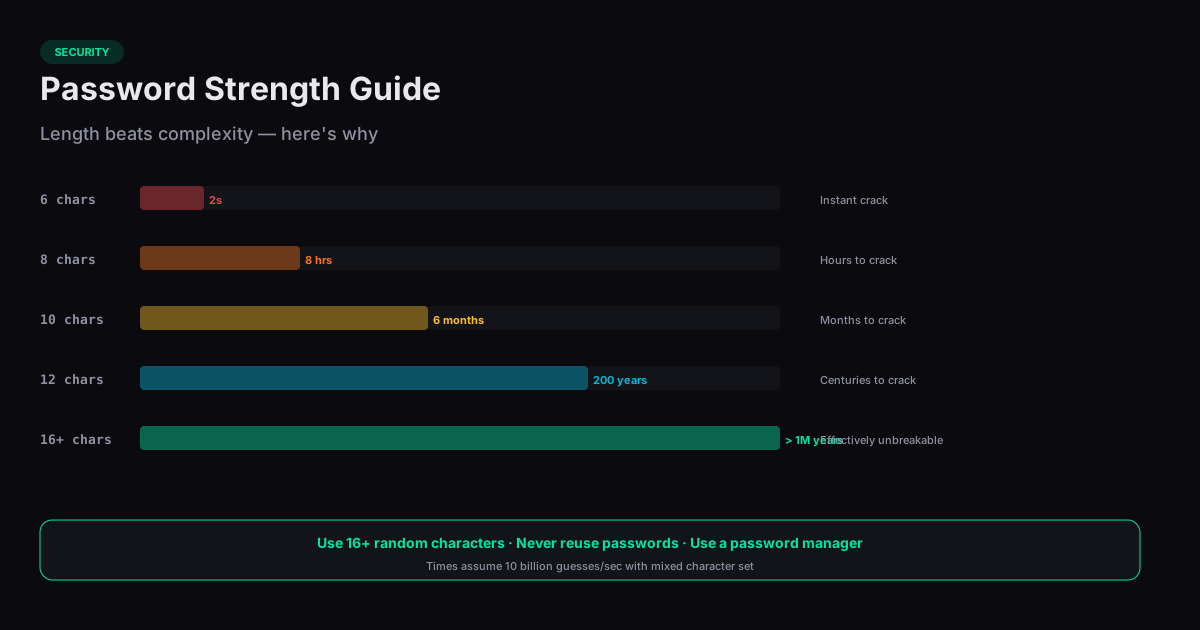
Knowing how to create strong passwords is one of the most important digital security skills. A strong password is your first line of defense against unauthorized access, and the difference between a weak password and a strong one is enormous — a random 12-character password would take centuries to crack by brute force, while a common 8-character password can be broken in minutes.
What Makes a Password Strong?
Password strength is measured in entropy — the number of bits of randomness in the password. A truly random 12-character password using uppercase, lowercase, digits, and symbols has roughly 79 bits of entropy. That means an attacker would need to try 2^79 (about 604 sextillion) combinations to guarantee finding it.
Length matters more than complexity. A 16-character password using only lowercase letters (26^16 combinations) is stronger than an 8-character password using all character types (95^8 combinations). Each additional character multiplies the search space, while adding complexity only increases the base. This is why modern security guidance emphasizes long passphrases over short complex passwords.
How Password Generators Work
A password generator uses a cryptographically secure random number generator (CSPRNG) to select each character independently from the allowed character set. Browser-based generators use the Web Crypto API (crypto.getRandomValues), which provides randomness sourced from the operating system's entropy pool — the same source used for TLS encryption.
This is significantly more random than human-generated passwords. People are predictably bad at randomness: we favor certain letters, use dictionary words, substitute predictable characters (@ for a, 3 for e), and reuse patterns. A generator has no such biases.
Password Length Recommendations
For general online accounts, 16 characters is a strong minimum. For high-security accounts (email, banking, password manager master password), use 20 or more characters. If the service limits password length, use the maximum allowed. If you are using a passphrase (random words), four to five words provides equivalent strength to a 16-20 character random password.
Avoid using the same password across multiple sites. A breach at one service exposes your credentials everywhere you reused that password. A password manager solves this by generating and storing unique passwords for every account, secured behind a single strong master password.
Beyond Passwords: Multi-Factor Authentication
Even the strongest password can be compromised through phishing, keyloggers, or server breaches. Multi-factor authentication (MFA) adds a second verification step — typically a time-based code from an authenticator app or a hardware security key. With MFA enabled, a stolen password alone is not enough to access your account. Enable MFA on every service that supports it, starting with your email and financial accounts.
Related Tools
Password Generator
Generate strong, random passwords with customizable length and character sets.
Hash Generator
Generate SHA-1, SHA-256, SHA-384, and SHA-512 hashes from any text — entirely in your browser.
UUID Generator
Generate random UUIDs (v4) and other UUID versions instantly in your browser.
QR Code Generator
Generate QR codes for URLs, text, email, and more — entirely in your browser.